
Protect Your Base from Resets in Enshrouded 1.0
Enshrouded / Windows PC / Windows PC 1.0 launch / 1.0.0.1; checked 16 October 2026
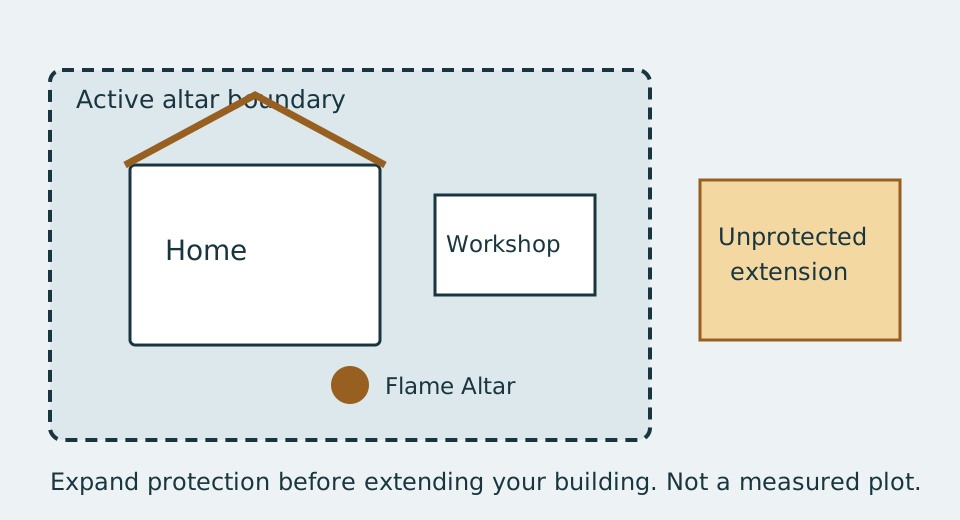
Enshrouded base protection comes from an active Flame Altar’s building boundary. Build and reshape terrain inside it to preserve the work. Outside it, the world can regenerate. Upgrade Altar expands the local building area; Strengthen the Flame changes global progression and Shroud access. These are different upgrades.
Place a protected home before building
Section titled “Place a protected home before building”Accept Claim A Spot For Your Base to unlock the Flame Altar recipe. Manual crafting requires 5 Any Stone. Place it above the Shroud on a site where the building area can contain the project you intend to keep.
- Craft and place the Flame Altar before investing in permanent construction.
- Inspect the marked building boundary. Include the house footprint, stairs, workshops and the terrain changes beneath them.
- Put the Workbench and your initial shelter inside those bounds.
- Check the outer edges again as you add rooms or carve into a hill. A wall looking close to the altar is not the same as its entire footprint being protected.
- Expand the altar area before extending a valuable structure beyond the existing boundary.
Which altar upgrade do I need?
Section titled “Which altar upgrade do I need?”| Your goal | Menu action | What to check |
|---|---|---|
| Add rooms, a courtyard or deeper excavation | Upgrade Altar | Local building-area size and the material requirement displayed in the menu. |
| Reach stronger Shroud regions | Strengthen the Flame | Global Flame level, survivors and progression materials. |
| Use another outpost | Place another Flame Altar | Current world-wide altar capacity. |
| Push back the Shroud around an altar | Late-game Flame feature | Flame level 11 under default rules; the required level can be changed in world settings. |
The established local area progression is 40×40×40 → 80×80×80 → 120×120×120 → 160×160×160. The first expansion uses one Shroud Core; later expansions require additional progression. Read the live upgrade menu before collecting resources for the next tier.
Do not apply the old blanket “ten altars maximum” limit to all of 1.0. The release adds more capacity later: the changelog specifies 16 altars at Flame level 11. That late-game limit does not mean a fresh character can place sixteen immediately. An individual altar’s area level is also not your global Flame level.
What resets outside the building boundary?
Section titled “What resets outside the building boundary?”The unprotected world can regenerate, including terrain edits and destroyed objects. A cleared camp or temporary tunnel should not be treated as a permanent base extension. The usual world reset behavior is different from the preserved construction inside an active altar.
Avoid planning around a guaranteed “leave exactly this many metres away” chest-reset trick. Current dedicated-server reports differ, and a timer or distance alone is not a dependable guide to getting another copy of starting loot. For supplies, use a repeatable short salvage expedition and return to your protected storage.
Move or remove an altar carefully
Section titled “Move or remove an altar carefully”Deactivate Altar starts a 30-second cancellation window. Once it disappears, the construction no longer has that altar’s protection and can be lost when the area resets. The waiting period is for cancelling removal; it is not a permanent backup of your home.
For relocation, prepare the new protected site first and move portable supplies before removing the old protection. Verify that the new altar actually covers the construction you need to keep. A replacement altar does not inherit the previous local area upgrades. Do not assume that placing a basic altar where an expanded one stood protects the whole former plot.
The global Flame level does not decrease when an altar is removed. That does not preserve the removed altar’s building boundary. If only one wing disappears after a reset, inspect the old boundary and the replacement area before treating it as a save-loss bug.
Returning to an Early Access home
Section titled “Returning to an Early Access home”Existing saves can be converted to 1.0. Keep a separate backup before making a major change to a valuable world. A conversion is not a reason to deactivate an altar to “refresh” the whole home. Inspect its protected edges, check the current upgrade menu, and confirm that any party member changing the layout understands the boundary.
For a shared settlement, read world and personal quest progress. Separate people’s characters and goals from the common world you are modifying together.