
Co-op Quest Progress & Catch-up in Enshrouded 1.0
Enshrouded / Windows PC / Windows PC 1.0 launch / 1.0.0.1; checked 16 October 2026
For Enshrouded co-op quest progression in 1.0, first read whether the journal marks the task personal or world. A shared world can advance while you are away. Check its missed-quest section for eligible tasks you can replay, but do not assume that every completed objective can be restored or that joining a server creates independent story progress.
Before the group starts advancing
Section titled “Before the group starts advancing”Enshrouded 1.0 explicitly shows personal and world quest labels. Main/side is a separate classification: it describes the task’s progression importance, not whether its completion belongs only to your character.
| Label or state | What to do with it |
|---|---|
| Personal quest | Read your own objectives and completion state. Another player’s progress is not enough to identify your next action. |
| World quest | Agree when the shared world will advance, particularly if someone wants to experience the milestone. |
| Main quest | Check prerequisites before travelling to the marker. Main does not mean automatically personal. |
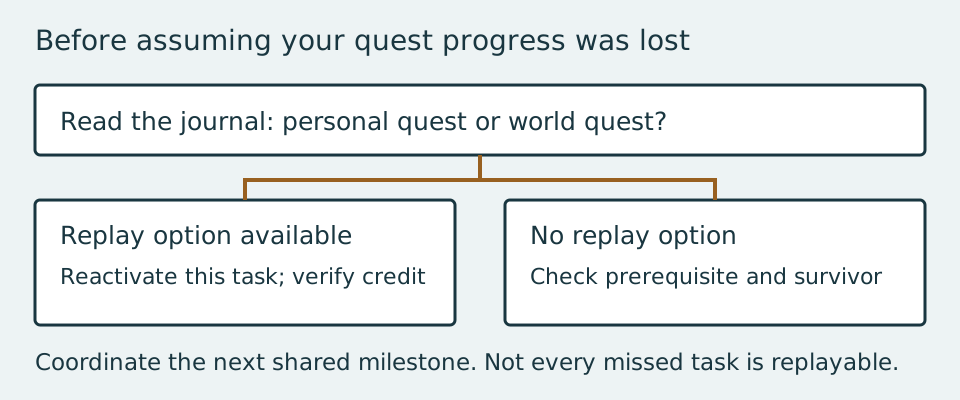
| Missed quest | Inspect whether your journal offers a way to reactivate that particular task. Availability is not universal. |
Choose who hosts the long-running world and which objectives the party wants to do together. If one player has much more free time, reserve agreed story milestones for shared sessions; use their solo time for building, gathering or their own private-world progression instead. This is a coordination method, not a server setting that converts every quest to personal progress.
Catch up when you return to an active server
Section titled “Catch up when you return to an active server”- Join the intended world with the character you normally use. Confirm you are not accidentally comparing a different world’s journal.
- Open the quest journal and read the current personal/world label and objective. Note the task name that you expected to complete.
- Inspect the missed-quest section below completed entries where available. Players commonly refer to it as Missed Embervale Quests; the displayed wording can vary with language or interface revision.
- If the specific task has a reactivation option, select it and follow its restored objective. Revisit the relevant location or NPC rather than treating the old completion state as proof that your own action finished.
- After the action, reopen the journal to confirm credit and check whether the next task appeared. Being online somewhere on the map is not a reliable verification by itself.
- If that task has no replay option, stop assuming the missed list is a universal reset. Compare the required preceding quest and speak to the relevant survivor before considering broader world changes.
If the next quest still does not appear
Section titled “If the next quest still does not appear”Primary quest access often depends on preceding regional progression. Speak to the survivor associated with the objective and inspect the tasks immediately before it. A missing pop-up does not always mean its prerequisite remains unfinished; some tasks can already be satisfied before the expected notification.
Current launch discussions disagree about how completely missed-quest replay solves old shared-world problems. This guide therefore gives the eligible replay workflow without promising a reset for every NPC, reward or story step. Do not delete a developed character because a forum reply says a new character is the only solution. Preserve the character and world while you isolate the specific missing objective.
If your group wants fully separate story experiences, keeping individual private worlds is a practical planning choice. Characters and world saves are distinct, so a new world can be explored with an existing character; that is not a promise to reconstruct every missed state in the original shared world. Back up important saves before experimenting, and agree which world is the party’s canonical home.
Separate loot sharing from quest sharing
Section titled “Separate loot sharing from quest sharing”A chest opened by one player does not guarantee identical personal copies for everyone. At the start, divide useful equipment and craft additional gear rather than basing the party plan on unverified chest reset claims. Confirm each player’s actual journal state when completing the next objective; a loot pickup alone does not show who received quest credit.
Can PC and PS5 friends use the same live world?
Section titled “Can PC and PS5 friends use the same live world?”Cross-platform co-op is not available at the 1.0 launch. Adventure Sharing and its codes are a different feature from playing a live session across platforms. This page covers Windows PC quest handling; do not assume identical controls or launch support on another platform.
Before the next joint trip, use the Rookmore preparation checklist and verify the base’s protected building area. Sharing a destination works best when everyone also knows what they need to do there.